
AlbumCamera1.1 - Google Play
You'll be able to see results in few seconds.
Publisher Description
2011/04/25 The function of the automatic focus is corrected For GalaxyS and HTC Desire
The application program that affixes and saves the comment in the image of which it takes a picture with the camera.
It is possible to transmit by appending the image and starting the mail application program.The version of supported OS is 2.0 or more.
In an optional setting of the application program, you can change five items.
(1)Change in preview resolution when taking a picture.
(The resolution that can be selected from information on display of your node is acquired)
(2)Change in saving resolution when taking a picture.
(The resolution that can be selected from information on display of your node is acquired)
(3)It is on or off of the auto focus.
(4)Change quality in saving image.
(value of quality is between from 1 to 100)
(5)Change in language used in application program.
(Japanese and English can be selected. Default is Japanese.)
(How to operate)
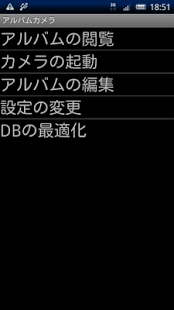
This application program consists of the following six screens.
(1)Start menu screen
The menu item can be started and each function be started by touching.
・Viewing images→It changes to (2).
・Starting the camera→It changes to (3).
・Editing your album→It changes to (5).
・Changing the setting→It changes to (6).
・Optimizing the DB→DB in the application program is optimized. Please execute it according to suitable timing.
(2)Album inspection screen
・When the image exists.
It touches lightly the display→The comment and information to the image are displayed.
It moves from the left to the right touching on the display→The following image is displayed.
It moves from the right to the left touching on the display→The previous image is displayed.
(The menu button is pressed)
To Menu screen→It changes to (1).
Attaching the image to an e-mail message→Attaching image on the display and it changes to the selection screen of the mail application program.
(3)Camera preview screen
The camera starts. After it takes a picture by touching, Saving temporary image.
After a while, it changes to (4).
(4)Screen where temporary image is displayed
Viewing temporary image what you take on (3)
There is the EditText that inputs the comment on the image under temporary image.
There is a limitation (255 characters or less and the number of lines 10 lines) in the input of the comment.
・Button under screen
Touching to Saving images button→After saving image, It changes to (1)
Touching to Take a photo again button→It changes to (3).
(5)Album edit screen
・When the image exists.
Only existing displays image information set[information,image,EditText that inputs the comment,checkbox for delete].
It is displayed up to five per page 1.
When six images or more are saved, to next page button is displayed.
When the previous page exists, to prev page button is displayed.
Touching to next page button→It changes to (5)
Touching to prev page button→It changes to (5)
・Button under screen
Touching execute button→Updating to comment for the image by EditText that inputs the comment and the image to make the deletion check box effective is deleted.
(6)Screen of setting change
・Language setting
Touching spinner object.
・Preview resolution
Touching spinner object.
・Resolution of images saved
Touching spinner object.
・Autofocus Setting
On or off Either touch of radiobutton.
・Picture Quality
After the slider is traced right and left touching, it separates.
・Button under screen
Touching Saving the setting button→The value has been selected by each item is saved→It changes to (1).
(Guidelines for Application)
・It reduces when inspecting it in the album even if the image is saved by a large resolution and it is displayed.
therefore Please saves it by a small resolution when it is not a usage appended with mail.
It is not possible to delete from the application program, and delete it from the SD card, please when it is unnecessary.
About AlbumCamera
The company that develops AlbumCamera is N2-Works. The latest version released by its developer is 1.1.
To install AlbumCamera on your Android device, just click the green Continue To App button above to start the installation process. The app is listed on our website since 2013-07-04 and was downloaded 0 times. We have already checked if the download link is safe, however for your own protection we recommend that you scan the downloaded app with your antivirus. Your antivirus may detect the AlbumCamera as malware as malware if the download link to net.n2works.AlbumCamera is broken.
How to install AlbumCamera on your Android device:
- Click on the Continue To App button on our website. This will redirect you to Google Play.
- Once the AlbumCamera is shown in the Google Play listing of your Android device, you can start its download and installation. Tap on the Install button located below the search bar and to the right of the app icon.
- A pop-up window with the permissions required by AlbumCamera will be shown. Click on Accept to continue the process.
- AlbumCamera will be downloaded onto your device, displaying a progress. Once the download completes, the installation will start and you'll get a notification after the installation is finished.
Program Details
System requirements
Download information
Pricing
Version History
version 1.1
posted on 2013-07-04
version 1.6 and up
posted on 2011-04-25
Several fixes and updates
Disclaimer
Official Google Play Link
We do not host AlbumCamera on our servers. We did not scan it for viruses, adware, spyware or other type of malware. This app is hosted by Google and passed their terms and conditions to be listed there. We recommend caution when installing it.
The Google Play link for AlbumCamera is provided to you by apps112.com without any warranties, representations or guarantees of any kind, so access it at your own risk.
If you have questions regarding this particular app contact the publisher directly. For questions about the functionalities of apps112.com contact us.
